What’s Xorq?
Xorq is three interlinked things, plus the interfaces built on them:
- An IR. An agent-native intermediate representation for cross-engine, composable, cacheable, declarative execution. A pipeline is an expression that compiles to many engines, caches at any node, and composes with other expressions.
- A ledger. The IR makes every pipeline a durable artifact that’s cheap to verify: one computation, defined before it runs, named by a hash of its definition, with lineage a person can read alongside it. The ledger steers agent work. An agent selects a reviewed entry instead of re-deriving it from source files.
- A command-line tool. It governs execution against the ledger: build, add, run, check-sources, pin, rebase, compose. Arbitrary compute enters the deterministic system through UDXFs, Python functions that exchange Arrow tables over Flight.
The interfaces on top serve different users. The command-line tool doubles as the headless mode for agents, and xorq catalog tui is the view for people.
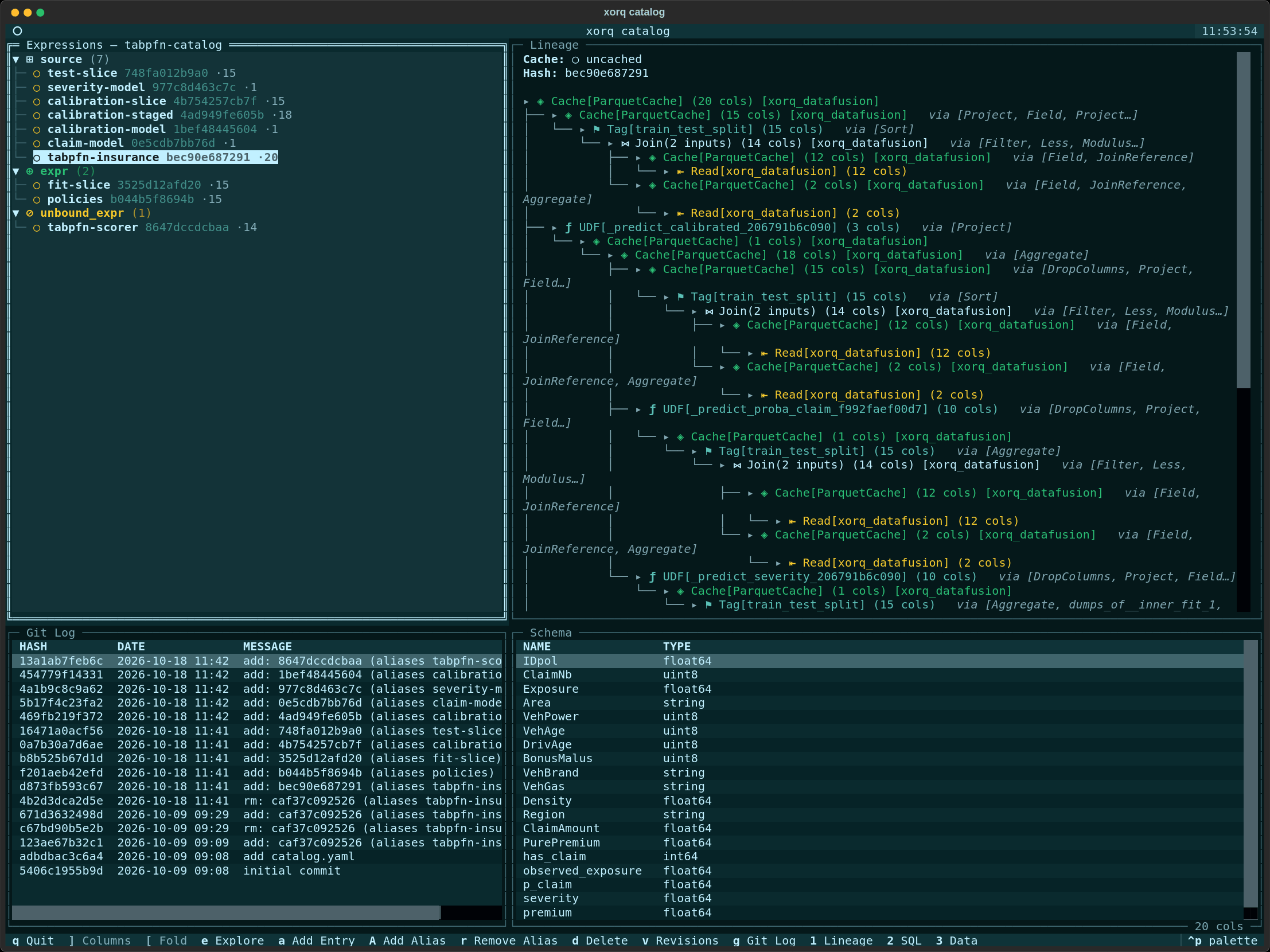
The screenshot shows the ten-entry ledger of an insurance pricing pipeline from A Commit vs. a Ledger Entry, with the scored test set’s lineage, schema, and git log.
Why a ledger steers agents
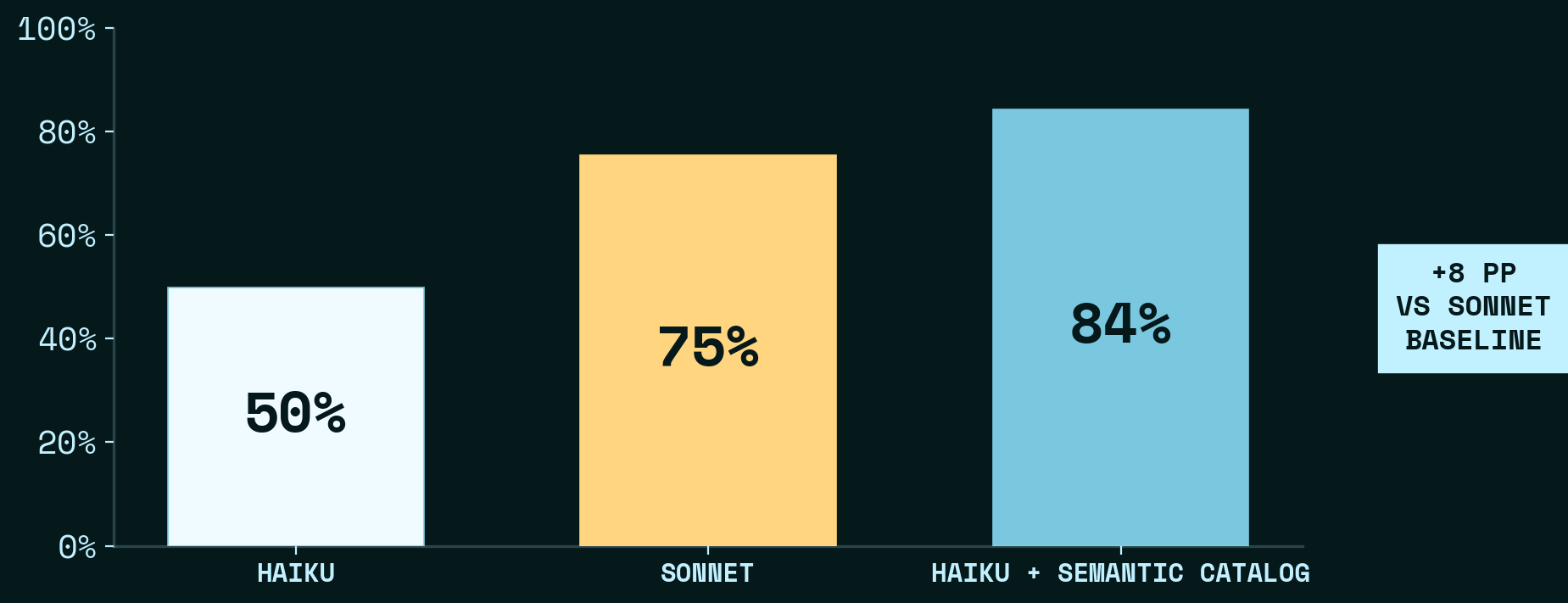
DABStep is 450 data-analysis questions over payment transaction data. With a Xorq ledger of 33 named expressions, Haiku goes from 50% to 84%, ahead of the 75% Sonnet baseline (Orientation Over Reasoning).
Faithful, Reproducible, Wrong asks one metric question 100 times per configuration. Two of its nine configurations run Haiku with Xorq on the same prompt. The only difference is whether a reviewed definition of the metric was preloaded:
| Re-derived from source files | Selected from a reviewed entry | |
|---|---|---|
| Correct | 0 of 100 | 100 of 100 |
| Median turns | 21 | 4 |
| Cost per run | $0.09 | $0.02 |
The IR
A Xorq expression describes a computation without running it. Each method call adds one operation to a tree of operations, and that tree is the IR. This example builds one, runs it, and saves it:
import xorq.api as xo

penguins = xo.examples.penguins.fetch()
expr = (
    penguins
    .filter(xo._.species.notnull())
    .cache(xo.ParquetCache.from_kwargs())
    .into_backend(xo.duckdb.connect())
    .group_by("species")
    .agg(avg_bill_length=xo._.bill_length_mm.mean())
)

df = expr.execute()
batches = expr.to_pyarrow_batches()
build_path = xo.build_expr(expr)
fetch returns a read of the penguins data, bound to Xorq’s embedded engine. xo._ is a deferred reference to the current table, so xo._.species is its species column. Each call after that (filter, cache, into_backend, group_by, agg) adds a node on top of the previous one. When the assignment to expr finishes, no data has been read or computed.
expr.execute() compiles the tree, runs it, and returns a pandas DataFrame. expr.to_pyarrow_batches() runs the same tree but streams the result as Arrow record batches instead.
Because the whole pipeline exists before it runs, the tree can say where each part runs and what to keep:
.cache(xo.ParquetCache.from_kwargs())stores the filtered rows as Parquet the first timeexprruns. The cache key comes from the operations under that node and the modification time of the penguins source, so the second call,to_pyarrow_batches(), reads the stored rows instead of filtering again. A change to either gives a new key..into_backend(xo.duckdb.connect())hands those rows to DuckDB as Arrow record batches. Thegroup_byandaggafter it run on DuckDB, while the read and the filter ran on the embedded engine. The other supported engines are listed in Supported backends.
xo.build_expr(expr) saves the tree. It writes builds/<hash>/expr.yaml, one node per operation, each named by a hash of its definition. That directory is what xorq catalog add puts in the ledger.
The expression API is Ibis, vendored into Xorq. If you know pandas or SQL, it looks familiar.
The ledger
The ledger is a git repo on the filesystem. The command-line tool calls it a catalog, which is why its commands live under xorq catalog. Aliases are symlinks, entries are zipped builds, and metadata sidecars are plain YAML, so an agent that clones the repo can discover everything with file operations.
An entry is a manifest plus the environment to run it. The manifest is the content-addressed specification of the pipeline: one node per operation, each referenced by hash, with schema, lineage, and inputs read straight off it. The wheel and requirements.txt next to it let the entry run in another sandbox, on your machine, or in production. When a build lacks them, xorq catalog add builds them from your project, which then needs a pyproject.toml and a uv.lock or requirements.txt. Identical computations get identical hashes, so an entry also works as a contract between teams: they find an existing computation by name and build on it.
The command line
Commands that act on an entry take its hash or an alias such as prod. When pin, rebase, or compose produce a different pipeline, they write it as a new entry. Entries are never edited in place, though aliases can move. By default, writes push the ledger to its remote.
xorq catalog run prod -o out.parquet          # execute in the entry's own environment
xorq catalog check-sources prod               # did a source schema drift? reports, never repairs
xorq catalog rebase prod                      # rebuild over drifted source schemas as a new entry
xorq catalog pin prod -e --alias prod-pinned  # materialize and freeze the caches as a new entry
xorq catalog compose src transform -a pipeline  # source entry + unbound transform entry, as one
A UDXF is how arbitrary compute joins the system. It’s a Python function from a pandas DataFrame to a DataFrame, served behind an Arrow Flight server, that gets named and cataloged like any other node. See User-defined exchange functions.
Who Xorq is for
Xorq is for data scientists, data engineers, ML engineers, and the agents that work alongside them. It fits teams that:
- Write SQL-heavy pipelines but need Python for ML.
- Run the same pipeline on several engines, such as DuckDB locally and Snowflake in production.
- Need reproducibility and lineage for compliance or debugging.
- Want to reuse reviewed computations instead of rewriting them.
Built on open standards
- Apache Arrow Flight streams Arrow data between processes.
- Apache DataFusion is the embedded engine for Arrow-native execution.
- uv builds the Python environment each entry records.
Xorq is open source under Apache 2.0 and pre-1.0. Expect breaking changes; the changelog marks them.
Next steps
- Quickstart to build your first pipeline
- The catalog as executable memory for more on the ledger
- Content-addressed artifacts for why entries are named by hash
- GitHub to star the repo and contribute
- Discord to join the community